

Tools and gear · Chapter 3
AI Toolkit for PreSales: Models, MCP, Connectors and Skills
What presales people need to know about AI tools today: APIs, MCP, connectors, skills, plugins, agents, and which model fits which presales job.
Presales people now need more than good prompts. Modern AI tools connect to your CRM, your documents and your mail, follow saved playbooks, and work through tasks in steps. Knowing the building blocks helps you pick the right tool, model and guard rails. It also helps you explain them to a customer's IT team.
Key takeaways
- Prompting is still the base. Connectors, skills and agents now take over much of the copy-and-paste work around it.
- Match the model tier to the job: cheap and fast for notes, frontier models for the business case (opens in a new tab).
- Treat customer data, connector permissions and unchecked output as risks you manage on purpose.
What changed since prompting
In 2025, using AI in presales mostly meant typing a good prompt into a chat window and copying the answer out. That still works, and the prompting chapter (opens in a new tab) still applies. What changed is everything around the prompt.
The assistant can now read your files, search your CRM and draft into your documents. It can follow a saved way of working instead of a fresh prompt each time. It can take a goal and work through the steps on its own, checking its own output as it goes. For presales that means less copy and paste, and more time for the parts only you can do: listening, judging fit and building trust.
The building blocks in one picture
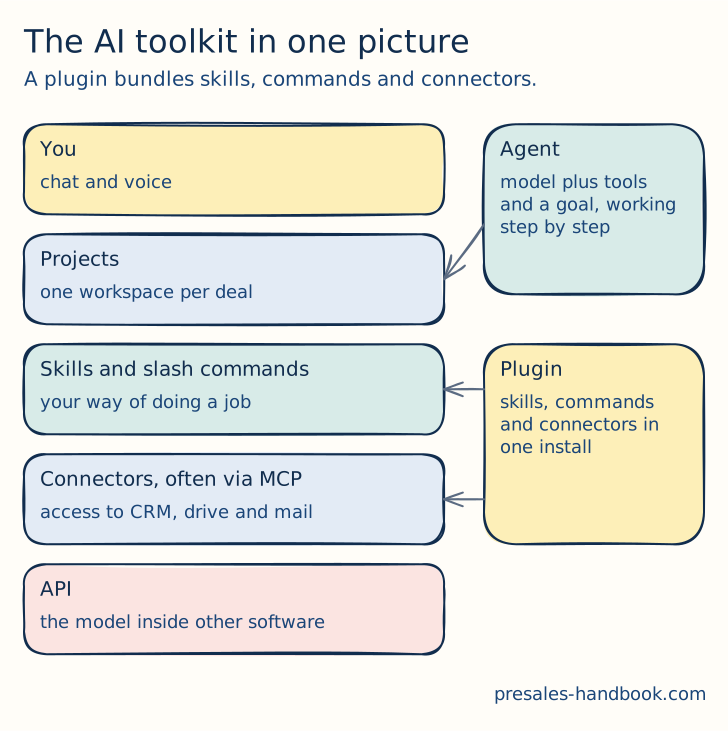
The AI toolkit in layers. A plugin bundles skills, commands and connectors for one job.
Read the picture from the top. You talk to the assistant. A project holds the context of one deal. Skills hold your way of doing a job. Connectors give access to your data. The API is how software vendors build AI into their own products. The sections below follow the same order, from the top down, and end with agents, which use all the layers.
Projects: one workspace per deal
A project is a workspace with its own files, instructions and chat history. Every answer inside it starts from that context.
Presales example. Create one project per deal. Load the discovery notes, the scoping document and the account brief. Your next question about the deal no longer needs a long preamble.
What to watch. A project only knows what you put in. Keep it current after each call, and remove files that no longer apply.
Skills and slash commands: your way of working, saved
A skill is a saved set of instructions, templates and examples that teaches the assistant how to do one job your way. The assistant loads it when the task fits. A slash command starts the same kind of saved routine by name, for example /demo-storyboard.
Presales example. A discovery-summary skill turns a call transcript into your team's summary format every time: pains, stakeholders, current process, next steps. An RFP skill maps each requirement to a capability and marks the gaps. The output looks the same no matter who ran it.
What to watch. A skill is only as good as the playbook behind it. Write it from your best real examples, then review the output of the first ten runs.
Plugins: the bundle for one job
A plugin packages skills, commands and connectors for one role or job, so you install it once and get everything. Updates reach everyone who installed it.
Presales example. A presales plugin can bundle a discovery prep command, an RFP response skill, a demo storyboard skill and a connector to the knowledge base. A new consultant gets the team's way of working on day one.
What to watch. Check who publishes the plugin and what its connectors can reach, just as you would for any software you install.
Ready-made presales skills. AI PreSales Skills is a free plugin for Claude, built on this handbook. It bundles skills and commands for the whole deal cycle, from discovery to handover. See how it works and how to install it (opens in a new tab).
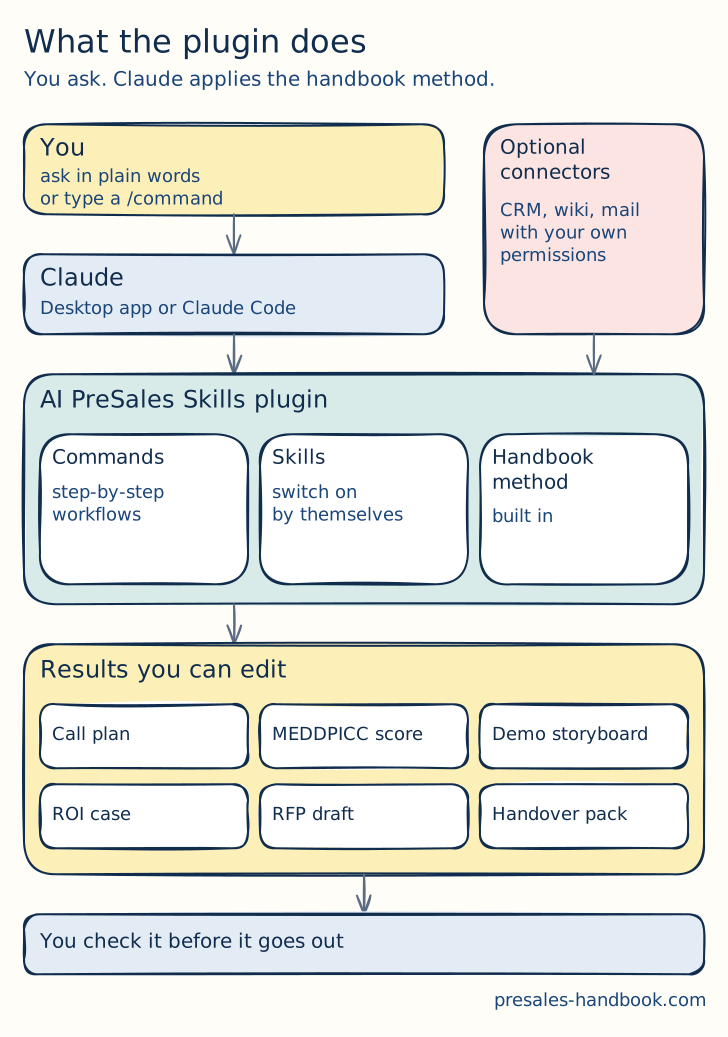
You ask, the plugin applies the handbook method, and you check the draft before it goes to a customer.
Connectors: your data, with your permissions
A connector is a ready-made link from the assistant to a named app, such as your drive, your mail or your CRM. Many install in a few clicks. In Claude, connectors are built on MCP, which the next section explains. Other assistants offer the same idea under their own names.
Presales example. Before a discovery call, you ask the assistant to pull the account history from the CRM and the last proposal from the shared drive. It writes a one-page brief. You check it and add your hypotheses. The sales discovery chapter (opens in a new tab) shows what that brief should contain.
What to watch. The assistant acts with your permissions. A broad mail or CRM grant is a broad grant. Connect only what the job needs, and follow your company's AI policy before you connect company systems.
MCP: one plug for every tool
MCP, the Model Context Protocol, is an open standard for connecting AI assistants to tools and data. Think of it as one plug shape instead of a custom cable for every pair of apps. A tool offers an MCP server, and any assistant that speaks MCP can use it.
Presales example. A team exposes its knowledge base of past RFP answers through an MCP server. The assistant can then search real, approved answers instead of guessing. See knowledge management (opens in a new tab) for why that base matters in the first place.
What to watch. An MCP server acts with the access it is given. Know who built it, what it can read and what it can change.
API: the model inside other software
An API is the door that lets software call an AI model directly, without a chat window. The vendor pays per amount of text processed, and the model answers inside their product.
Presales example. Your own product probably uses an AI model through an API. In a security review, the customer will ask which model, where the data goes and whether it is used for training. You need clear answers, backed by your vendor's documentation.
What to watch. Ask your product team for a one-page note on the model provider, the data region, retention and training use. Customers ask the same four questions every time.
Agents: a goal, worked in steps
An agent is a model that works toward a goal in several steps. It uses the layers above: your project, your skills and your connectors. It checks its own work and keeps going until the task is done or it needs you.
Presales example. An RFP agent reads the requirement list, drafts answers from approved sources and flags every answer it is unsure about. The RFX chapter (opens in a new tab) still decides whether you should answer at all.
What to watch. Agents are fast, and they sound confident even when they are wrong. Keep a person in the loop before anything reaches a customer.
Which model for which job
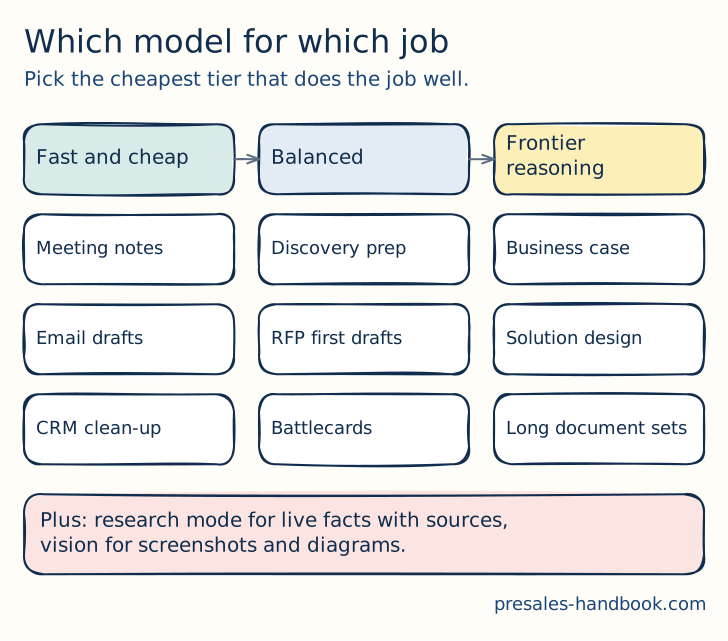
Match the model tier to the job. Start cheap and move up only when the answer is not good enough.
Every major vendor now sells models in tiers. Fast and cheap models handle high-volume, short work like meeting notes and email drafts. Balanced models do most professional work well, such as discovery prep and first drafts of RFP answers. Frontier reasoning models cost more and shine on long, hard tasks: a business case, a solution design, or a stack of long documents. Research modes look up current facts with sources, and most models can now read screenshots and diagrams.
The rule is simple. Start with the cheapest tier that does the job well, and move up only when the answer falls short. Running every small task on a frontier model burns budget without better results.
Checked on 28 September 2026. Anthropic: Claude Haiku 4.5 is the fast tier and Claude Sonnet 5 the balanced one. Claude Opus 5.5 is the frontier default, and Claude Fable 5.1 is its most capable model for the hardest reasoning. OpenAI: GPT-6 Luna, GPT-6 Sol and GPT-6 Astra, from cheapest to most capable. Google: Gemini 3.5 Flash-Lite, Gemini 3.8 Flash and Gemini 3.1 Pro, which is still in preview. Names change every few months, so check the vendor's model page before you choose.
Risks before you connect customer data
Customer data leaving your tenant. Know where each tool sends data, where it is stored and whether it is used for training. Your company's AI policy comes first.
Permission scope. Connectors act with your access. Grant the smallest scope that does the job.
Confident mistakes. Models still invent facts. Check every number, price, legal or security statement before it leaves the team.
Instructions hidden in documents. A document the assistant reads can contain text that tries to steer it. Never let the assistant send mail or update the CRM based on a customer document without checking first.
Cost creep. Every always-on connector and skill uses up the assistant's working memory, called context, and money. Turn off what you do not use.
How to start this week
- Create one project for your most active deal and load the discovery notes.
- Connect one data source you use daily, with the smallest scope that works.
- Turn your best discovery summary into a reusable skill or saved prompt.
- Run your next follow-up email on a fast model and your next business case on a frontier model. Compare the quality and the cost.
- Write down what you checked by hand. That list becomes your team's review rule.
Do I need to code to use MCP?
No. Most assistants let you add a connector or an MCP server from a settings page. Building a new MCP server takes some development work, but using one does not.
Is it safe to connect my CRM?
It can be, if you follow your company's AI policy, use a business plan with clear data terms, and grant the smallest scope that works. Start with read access and one account.
Which model should I start with?
Start with a balanced model for daily presales work. Use a fast model for high-volume tasks like notes, and a frontier model for the business case and long document sets.
From the blog
- 5 min read
Automation Isn’t Replacing PreSales! It’s Elevating It!
Automation takes repetitive work off presales teams so they can spend more time on discovery, strategy and real customer conversations.
Read more - 6 min read
AI Won’t Replace PreSales Teams, But PreSales Professionals Who Use AI Will Replace Those Who Don’t
AI will not replace presales teams. People who use it well will outpace those who don't. Where AI helps today and how to start.
Read more - 8 min read
Top 19 Focus Areas for Presales Professionals in 2025
Nineteen areas for presales to focus on in 2025, from storytelling and personalised demos to AI, buyer enablement and ethics.
Read more