

Free plugin for Claude
Your presales co-pilot in Claude
AI PreSales Skills turns Claude into a presales colleague who knows the whole deal cycle. You tell it what you sell. It applies the handbook's method to your deal.
What it does for you
Six jobs it takes off your desk. You review the draft and make the calls.
A one-page call plan
Research, persona hypotheses and a question plan for your next discovery call.
A MEDDPICC score with gaps
It scores the deal out of 40 and lists the gaps and next actions.
A demo storyboard
A Tell-Show-Tell storyboard built from the pains you found in discovery.
An ROI case
A value case with three or more value drivers and an explicit risk factor.
A first RFP response
It maps every requirement to a capability, drafts the answers and tracks what is covered.
A handover pack
The handover package for the delivery team, plus an agenda for the handover call.
How it works
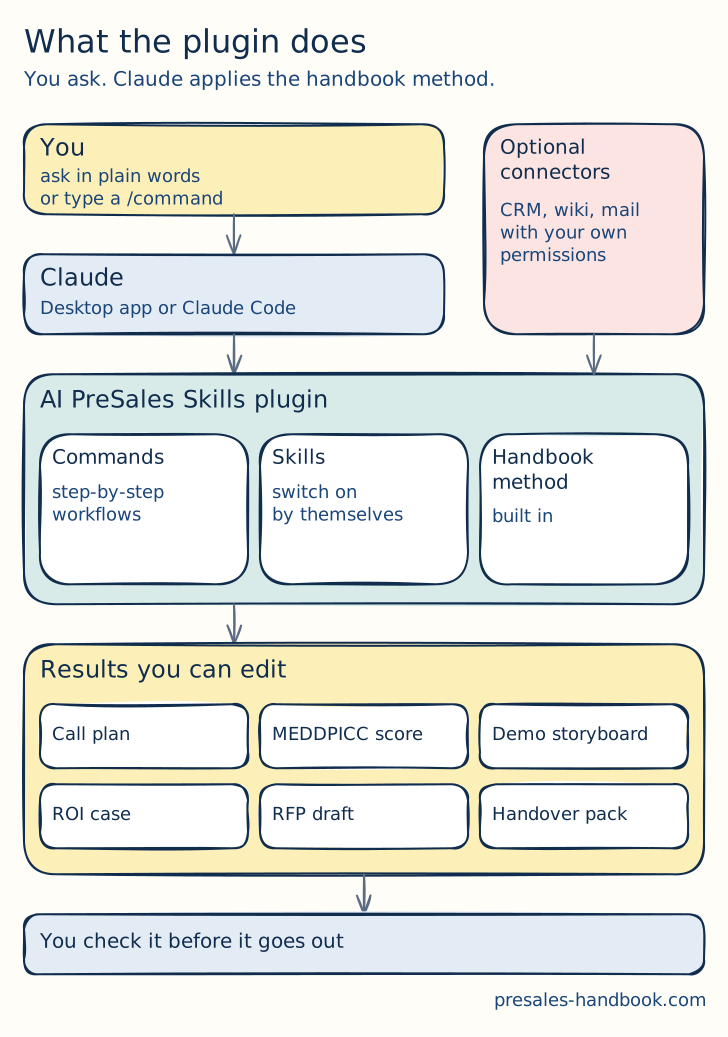
- Commands are step-by-step workflows. You start one by typing a slash, for example /presales:discovery:prep.
- Skills switch on by themselves when you describe what you need in plain words.
- Connecting your CRM, wiki or mail is optional. Without it, Claude asks you, and the output quality is the same.
Install in 5 minutes
Pick one way. The desktop app works with clicks and two short pastes.
What you need
A paid Claude plan: Pro, Max, Team or Enterprise. An Anthropic Console account works too. You do not need to know how to code.
Desktop app (a few clicks)
Install the Claude desktop app from claude.ai/download and open it.
Open the Code tab.
Click the + button next to the message box. Then click Plugins and Add plugin.
Paste this into the marketplace field and confirm:
hangljoe/AI-PreSales-SkillsInstall AI PreSales Skills from the list.
Back in the Code tab, paste this into the message box and press Enter. A short guide asks what you are working on. You are set up.
/presales:guide
Terminal
Install Claude Code. On a Mac, open the Terminal app and paste the first line. On Windows, open PowerShell and paste the second.
macOS (Terminal)
curl -fsSL https://claude.ai/install.sh | bashWindows (PowerShell)
irm https://claude.ai/install.ps1 | iexType this and press Enter. The first time, you log in with your Claude account.
claudeInside Claude Code, add the marketplace:
/plugin marketplace add hangljoe/AI-PreSales-SkillsInstall the plugin. Restart Claude Code when it asks you to.
/plugin install presales@presales-handbookType this and press Enter. A short guide asks what you are working on. You are set up.
/presales:guide
Updates come from GitHub. To update right away, run this:
/plugin update presales@presales-handbookRolling it out to a team? On Claude Team or Enterprise, an admin can switch it on for everyone. See the team setup on GitHub
Your first 10 minutes
Tell Claude what you sell
The skills work for any product. The first time they need it, they ask about your product, strengths and competitors.
Try the guide
Run /presales:guide and describe your situation, for example a discovery call with a CFO on Thursday. It points you to the right tool.
Run one real workflow
Start with /presales:discovery:prep for your next call. Claude asks for what it needs and writes a one-page call plan.
Just talk
Say "structure these notes" and paste your call notes. The right skill switches on by itself.
Before anything goes to a customer, say "tag this". Claude marks every claim as confirmed, inferred or unknown.
The deal journey at a glance
Each stage links to its chapter in the handbook and names the command to start with.
| Stage and chapter | Start with |
|---|---|
| Research the account | /presales:account:brief |
| Sales discovery | /presales:discovery:prep |
| Qualify hard | /presales:discovery:qualify |
| Functional and technical discovery | /presales:discovery:summary |
| Scope the opportunity | /presales:handover:osd-draft |
| Decide whether to invest | /presales:discovery:tfq |
| Build the value case | /presales:value:pain-to-value |
| Tell the story | /presales:demo:storyboard |
| Prove it | /presales:deal:poc-plan |
| Answer the RFX | /presales:rfp:respond |
| Handle objections | /presales:deal:objection-drill |
| Close the deal | /presales:deal:proposal |
| Learn from the outcome | “debrief this win” |
| Hand over to delivery | /presales:handover:doc |
Before you use customer data
- Check your company's AI policy first. It decides which data you may share with an AI tool.
- Connectors act with your permissions. Connect only what the job needs.
- Before anything leaves the team, say "tag this" and check each claim.
Questions
Do I need to code?
No. You install it with a few clicks or two pasted lines. After that you talk to Claude in plain words.
Which Claude plan do I need?
A paid plan: Pro, Max, Team or Enterprise. An Anthropic Console account works too.
Does it work with my product?
Yes. It is vendor-neutral and works for any B2B or SaaS product. You tell it what you sell, and it applies the method to your deal.
Is it free?
Yes. The skills, commands and scripts are MIT-licensed, so you can use and adapt them. The handbook reference inside stays under the author's copyright. You still need a paid Claude plan to run them.
What if it does not work?
If the /presales commands do not appear, restart Claude Code and check that presales is listed under Installed in the /plugin menu. If the marketplace is not found, check the spelling. A company network may block GitHub, so ask IT or try another network.
Try it on your next deal
The plugin, the full command list and the changelog live on GitHub.
View on GitHub