
Tools and gear · Chapter 8
Software
Software that makes presales work easier: content sharing, screenshots, ROI tools, demo automation, RFPs and Excalidraw for whiteboarding.
Key takeaways
- The tools presales teams use, grouped by job: content sharing, screen capture, ROI (opens in a new tab), demo automation (opens in a new tab), RFPs (opens in a new tab) and whiteboarding. For whiteboarding I use only Excalidraw.
- A growing part covers AI tools for writing, images, presentations, video and sales training.
- Choose tools that save preparation time or make your value clearer to the customer. More tools alone do not win deals.
Content Sharing with Prospects

Paperflite
With Paperflite you build custom microsites for your sales content and track how buyers use them. It is sales enablement and marketing content software, built to shorten sales cycles.
Pictures, Screenshots & Content

Snagit Screen capture
Snagit takes screenshots and screen recordings. It is easy to use. You can capture a region, a window or a scrolling page, add arrows and notes, and share the result in a few clicks.
Return on Investment (ROI)

theROIshop
The ROI Shop lets you build custom ROI calculators that customers can use and understand. They show the financial benefit of your solution in numbers the customer can check. The calculators are interactive, so the customer can enter their own figures. The software also offers data analysis, real-time collaboration and detailed reports. When customers see the value of the investment themselves, deals tend to close faster.
theROIshop (opens in a new tab)
Demo & Demo Automation

Walnut.io
Walnut.io lets you build interactive product demos and tailor each one to a prospect. A tailored demo shows the buyer their own case, so it lands better. Walnut tracks how prospects use the demo and feeds that data into your CRM. You see who clicked what and can follow up on it. Walnut also connects to other tools used by sales, marketing and customer success teams.
Vimeo video (opens in a new tab)
Demoboost
Demoboost is a demo automation platform for sales and marketing teams. It combines what Walnut and Consensus do in one tool. You can build guided tours, videos, sandboxes, overlays and mobile demos. So you can pick the format that fits the audience and the sales situation. Demoboost connects to common sales and marketing tools, so it fits into the way your team already works.
Demoboost (opens in a new tab)

GoConsensus
GoConsensus is a demo automation platform for personalized, interactive video demos. Buyers watch them on demand, and each stakeholder sees the parts that matter to them. Its "Demolytics" feature tracks who watched what. Sales teams use that data to see which leads are engaged and where to focus. GoConsensus integrates with common sales tools.
GoConsensus (opens in a new tab)
Sales Insights

Gong.io
Gong.io records and analyzes your sales conversations and shows what works and what does not. It picks up how customers feel and what they need. Your team can learn from each other's best calls. Gong also tracks how conversations move deals and points you to the most promising leads.
Opportunity Management

Homerun PreSales
Homerun PreSales puts all presales activities into one workspace. You manage tasks, track deals and log activities automatically. Presales leaders see the whole presales pipeline. Shared tools keep sales and post-sales teams aligned. Integrations sync the data with your other applications, so there is less admin work.
Homerun Presales (opens in a new tab)
Personal CRM

Dex
Dex is a personal CRM (Customer Relationship Management) tool. It helps you organize your contacts and keep your relationships warm.
Key Features:
- Centralized Contact Management: Dex pulls contacts from LinkedIn, Facebook, Gmail and other sources into one place.
- Smart Notifications: It reminds you to keep in touch, so you do not miss an important date or follow-up.
- Note-Taking: You can take notes on interactions, helping you remember important details about your contacts.
- Integration: Dex connects to common platforms and keeps your contacts up to date.
Benefits for Presales:
- Relationship Building: Reminders and notes on past conversations help you stay in touch with potential clients.
- Efficiency: Dex merges contacts and updates them automatically. You spend less time typing data by hand.
- Personalization: With detailed notes, you can write to each contact in a personal way.
- Integration with Workflow: Dex works with LinkedIn and Gmail, so you manage relationships in the tools you already use.
RFP Supporting Tools

responsive
RFPIO automates much of the RFP response work, so you answer faster with less effort. A central content library lets you reuse past answers. The team works on the response together, and analytics show where the process is slow. It connects to systems like your CRM and cloud storage.
Responsive.io (opens in a new tab)
Proof of Concept (POC) Support

Opine specializes in automating proof-of-concept (POC (opens in a new tab)) processes for enterprise software. Their platform uses testimonials to build trust between vendors and buyers faster, which speeds up POCs.
Try OPINE (opens in a new tab)
Whiteboard: Excalidraw
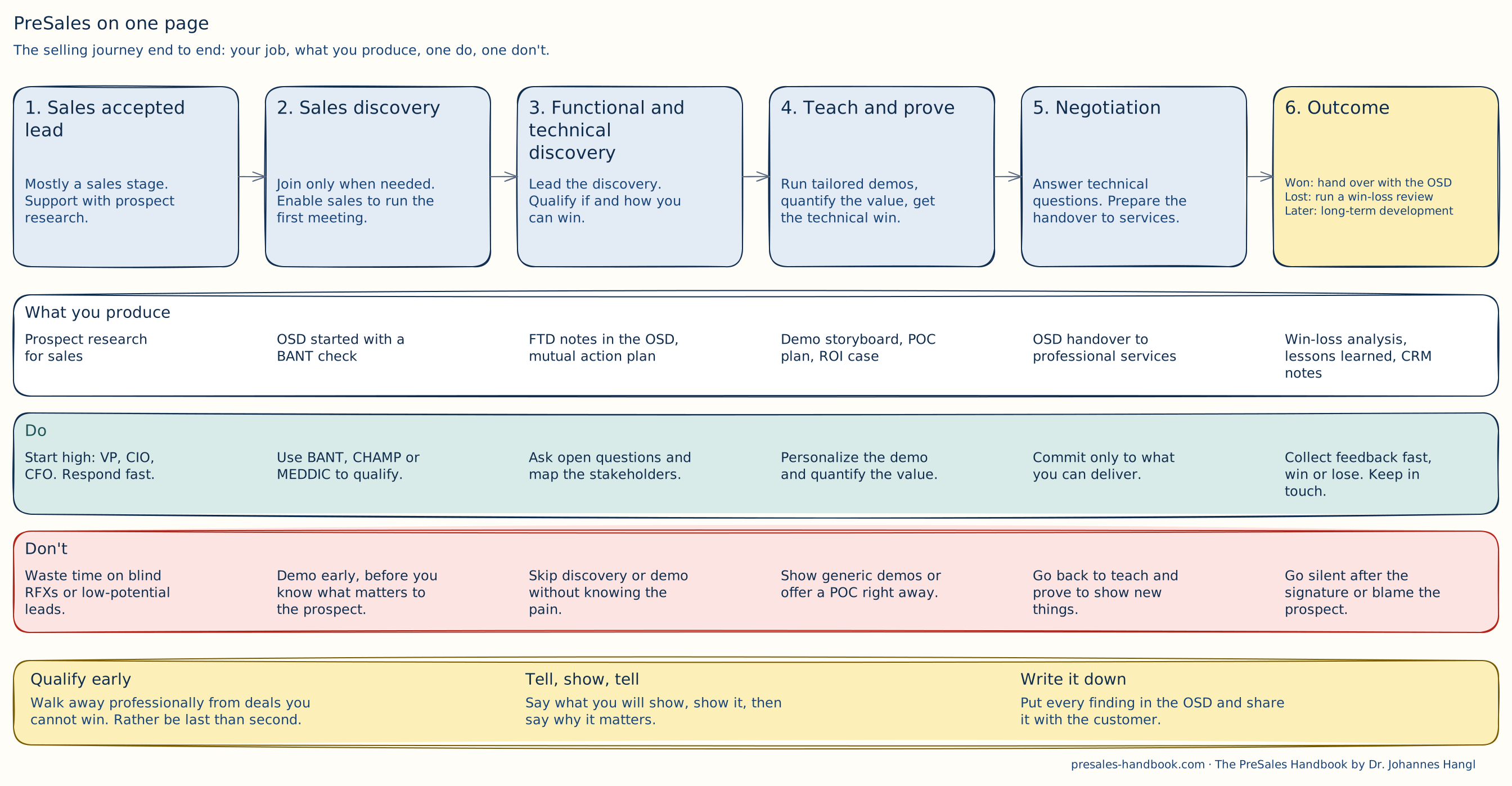
For whiteboarding I use one tool: Excalidraw (opens in a new tab). Every diagram on this site is drawn in it, including the one above. I used Miro and tried Mural, FigJam, Lucidspark and Microsoft Whiteboard. They are all good. I still came back to Excalidraw every time, so I stopped pretending and made it my only one.
Why Excalidraw
- The hand-drawn look invites people in. A sketch looks unfinished, so customers dare to change it. A polished diagram looks final, and people only nod.
- It is fast. Open the browser, draw. No login, no board setup, no template gallery to scroll through.
- It is free and open source. The free version at excalidraw.com covers most of what a presales consultant (opens in a new tab) needs.
- Live collaboration is private. You share a link, and everyone draws on the same canvas. The session is end-to-end encrypted.
How I Use It in Presales
- In discovery. I share my screen and draw the customer's process while they talk. They correct my boxes and arrows. After ten minutes we both see the same picture, and I know where the pain sits.
- For solution sketches. Before a demo I draw the target picture: systems, data flows, who does what. It goes into the OSD (opens in a new tab) and into the follow-up mail.
- For demo storyboards. One box per scene, arrows for the flow. I see the whole story before I build a single slide.
- For this handbook. Every diagram here started as an Excalidraw sketch. I keep the source files, so I can update a drawing in minutes.
Tips That Save Time
- Learn four shortcuts. R for a rectangle, O for an ellipse, A for an arrow, T for text. You never touch the toolbar again.
- Double-click to write. Double-click anywhere on the canvas and start typing. Double-click a shape to write inside it.
- Hold Alt (Option on a Mac) and drag to copy. Handy for rows of equal boxes.
- Use few colours. Pick two or three fill colours and give each one a meaning. On this site, yellow marks the outcome and red marks mistakes.
- Draw rough first. Get the story right, then make it pretty. Nobody remembers straight lines, everybody remembers a clear story.
excalidraw.com or Excalidraw+?
| excalidraw.com | Excalidraw+ | |
|---|---|---|
| Price | Free | About 6 USD per user and month, 14 days free trial |
| Storage | In your browser. Save the file yourself | Synced to the cloud |
| Scenes | One canvas at a time | As many as you want, in folders |
| Collaboration | Live via share link, end-to-end encrypted | Invite people, view-only links, comments, teams |
| Presenting | No | Presentation mode, voice and screen sharing |
| Export | PNG, SVG and the .excalidraw file | Also PDF and PowerPoint |
Start with the free version. Switch to Excalidraw+ when you lose track of your drawings or want to present straight from the canvas. Check the current plans (opens in a new tab) before you buy.
Libraries
Libraries are ready-made shapes you drop into your drawing. Think cloud icons, servers, people, devices, flowchart symbols. Browse libraries.excalidraw.com (opens in a new tab) and click "Add to Excalidraw". The shapes then sit in your library panel. You can also build your own library, for example with your product's modules. Then every sketch looks like your world.
Export
- PNG for slides, emails and chat. Turn on "Background" if the picture goes on a dark slide.
- SVG for websites and documents. It stays sharp at any size. All diagrams on this site are SVG.
- The .excalidraw file is your source. Keep it next to the export, so you can change the drawing later.
- Embed the scene. Tick "Embed scene" when you export a PNG or SVG. You can open the image in Excalidraw again and keep drawing.
AI Writing Tools
AI writing tools like ChatGPT help you draft emails, proposals and technical documentation faster, in a consistent tone.
| Name & Link | Description and Pricing (2025) |
|---|---|
| ChatGPT (opens in a new tab) | An AI language model developed by OpenAI that interacts in a conversational way to assist with writing, learning, brainstorming, and more. Cost: Free plan available; Plus plan at $20/month; Pro plan at $200/month; Team plan at $25/user/month (billed annually) or $30/user/month (billed monthly) |
| Grammarly (opens in a new tab) | An AI-powered writing assistant that helps you write mistake-free, clear, and effective content by providing grammar, spelling, and style suggestions. Cost: Free plan available; Premium plan at $12/month (billed annually) or $30/month (billed monthly); Business plan at custom pricing. |
| Jasper (opens in a new tab) | A generative AI platform designed for marketing, offering tools to create, optimize, and manage marketing content with advanced brand control and AI-powered workflows. Cost: Creator plan at $39/month; Pro plan at $59/month; Business plan with custom pricing. |
| Copy.ai (opens in a new tab) | An AI writing tool that generates various types of content, such as marketing emails, social media posts, and product descriptions, to help overcome writer's block and enhance productivity. Cost: Free plan available; Pro plan at $42/month; Team plan at $249/month; Growth plan at $1,333/month; Expansion plan at $2,666/month; Scale plan at $4,000/month. |
| Writesonic (opens in a new tab) | A comprehensive AI writing platform that creates, optimizes, and publishes content for different marketing channels, offering features like SEO optimization, brand voice cloning, and competitor analysis. Cost: Free plan available; Individual plan at $16/month (billed annually); Standard plan at $79/month (billed annually); Enterprise plan with custom pricing. |
AI Picture
Generate images, concept art or custom visuals with tools like MidJourney, DALL·E 2 ChatGPT, and Copilot. Use them for presentations or marketing material.
| Name & Link | Description and Pricing (2025) |
|---|---|
| MidJourney (opens in a new tab) | An AI-powered tool for generating realistic images from text prompts. Cost: Basic plan at $10/month; Standard plan at $30/month; Pro plan at $60/month; Mega plan at $120/month |
| ChatGPT (opens in a new tab) / DALL·E | DALL·E: An AI language model and image generation tool by OpenAI that assists with writing, brainstorming, and creating images from text prompts. Cost: Free plan available; Plus plan at $20/month; Pro plan at $200/month; Team plan at $25/user/month (billed annually) or $30/user/month (billed monthly |
| Leonardo AI (opens in a new tab) | A suite of AI tools for developers and businesses, offering advanced capabilities through API plans. Cost: API Basic plan at $9/month; API Standard plan at $49/month; API Pro plan at $299/month; API Custom plan with custom pricing |
| Runway ML (opens in a new tab) | A comprehensive video editing software that uses AI to simplify the video creation process. Cost: Free plan available; Standard plan at $12/user/month (billed annually); Pro plan at $49/user/month (billed annually); Enterprise plan with custom pricing |
AI PresentationTools
These AI tools build interactive presentations from your input. They help you explain a complex solution clearly.
| Name & Link | Description and Pricing (2025) |
|---|---|
| Beautiful.ai (opens in a new tab) | A cloud-based presentation software that uses AI to help users create professional-looking presentations quickly and easily. Cost: Pro plan at $12/month (billed annually); Team plan at $40/user/month (billed annually); Enterprise plan with custom pricing |
| Prezi (opens in a new tab) | A presentation tool that transforms traditional slides into interactive, visually engaging stories with a unique zoomable canvas. Cost: Standard plan at $7/month (billed annually); Plus plan at $19/month (billed annually); Premium plan at $29/month (billed annually) |
| Pitch (opens in a new tab) | A collaborative presentation software designed for modern teams, offering real-time collaboration, smart templates, and advanced design tools. Cost: Starter plan at $10/user/month; Pro plan at $20/user/month; Enterprise plan with custom pricing |
| Copilot for Powerpoint (opens in a new tab) | An AI-powered assistant integrated into Microsoft 365 that helps users create, design, and enhance PowerPoint presentations with ease. Cost: Included in Microsoft 365 subscriptions; Personal plan at $6.99/month; Family plan at $9.99/month; Business plans starting at $12.50/user/month |
AI Design Tools
| Name & Link | Description and Pricing (2025) |
|---|---|
| Canva (opens in a new tab) | A versatile online design tool that allows users to create stunning graphics, presentations, social media posts, and more with ease. Cost: Free plan available; Pro plan at $12.99/month (billed annually) or $119.99/year; Teams plan at $8.33/user/month (billed annually); Enterprise plan with custom pricing |
| Piktochart (opens in a new tab) | A cloud-based graphic design software that helps users create infographics, presentations, reports, and more with a user-friendly interface and customizable templates. Cost: Free plan available; Pro plan at $14/month (billed annually) or $29/month (billed monthly); Business plan at $24/month (billed annually) or $49/month (billed monthly) |
| Visme (opens in a new tab) | An all-in-one visual content creation platform for making infographics, presentations, social media graphics, and more, with a wide variety of templates and interactive elements. Cost: Free plan available; Starter plan at $12.25/month (billed annually) or $29/month (billed monthly); Pro plan at $24.75/month (billed annually) or $49/month (billed monthly) |
AI Video Tools
| Name & Link | Description and Pricing (2025) |
|---|---|
| HeyGen (opens in a new tab) | An AI-powered video creation platform that allows users to generate professional videos featuring avatars, with options for text-to-speech and visual elements. Cost: Free plan: $0/month (3 videos/month, up to 3 minutes each, 720p resolution) Creator plan: $24/month (unlimited videos, up to 5 minutes each, 1080p resolution) Team plan: $69/user/month (unlimited videos, up to 30 minutes each, 1080p resolution) Enterprise plan: Custom pricing (unlimited videos, no duration max, up to 4K resolution) |
| Synthesia (opens in a new tab) | A cloud-based platform that uses AI to create realistic training and marketing videos with human-like avatars and voice synthesis technology. Cost: Free plan: $0/month (3 minutes of video/month) Starter plan: $18/month (36 minutes of video/year) Creator plan: $89/month (360 minutes of video/year) Enterprise plan: Custom pricing |
AI Sales Training Tools
| Name & Link | Description and Pricing (2025) |
|---|---|
| Spekit (opens in a new tab) | An AI-powered, just-in-time enablement platform that centralizes and surfaces the answers, content, and training sales reps need to thrive in any tool or workflow. Cost: Starts at $20/user/month |
| Second Nature AI (opens in a new tab) | An AI-driven sales coaching software that provides a virtual role play partner to simulate sales discussions, score reps, and train them to improve their performance. Cost: Pricing not publicly available; typically requires contacting the vendor for a quote. |
| Copy.ai (opens in a new tab) | An AI writing tool that generates various types of content, such as marketing emails, social media posts, and product descriptions, to help overcome writer's block and enhance productivity. Cost: Free plan available; Pro plan at $42/month; Team plan at $249/month; Growth plan at $1,333/month; Expansion plan at $2,666/month; Scale plan at $4,000/month. |
Q&A Bots for Knowledge Management
Create a repository of frequently asked questions and answers, easily accessible through chatbots. These bots save time and ensure consistency in responses.
| Name & Link | Description and Pricing (2025) |
|---|---|
| Intercom (opens in a new tab) | A comprehensive customer communication platform that combines messaging, automation, and AI to enhance customer support and engagement. Cost: Essential plan at $29/user/month; Professional plan at $85/user/month; Enterprise plan at $132/user/month |
| Ada (opens in a new tab) | An AI-powered chatbot platform designed to automate customer interactions and provide personalized support across various channels. Cost: Pricing not publicly available; typically requires contacting the vendor for a quote |
| ChatGPT (opens in a new tab) Private Model | An AI language model developed by OpenAI that interacts in a conversational way to assist with writing, learning, brainstorming, and more. Cost: Plus plan at $20/month; Pro plan at $200/month; Team plan at $25/user/month (billed annually) or $30/user/month (billed monthly) |
Competitive Intelligence
| Name & Link | Description and Pricing (2025) |
|---|---|
| Crayon (opens in a new tab) | A competitive intelligence platform that helps businesses track, analyze, and act on market activities. It offers features like competitor tracking, battlecards, dashboards, and unlimited user licenses. Cost: Pricing varies based on headcount. For example, for a headcount of 200, the cost ranges from $16,800 to $31,000 annually. For larger organizations, the pricing can range from $31,700 to $70,300 annually |
| Kompyte (opens in a new tab) | A competitive intelligence tool that enables sales teams to track competitors, create battlecards, and receive real-time insights. It includes features like automated company profiles, sales enablement, and advanced reporting. Cost: Pricing is customized based on the number of competitors tracked and user licenses. For example, the Basic plan starts at $300/year, with higher tiers offering more features and capabilities |
From the blog
- 4 min read
The Multitasking Myth in PreSales: What Really Works?
Multitasking feels productive but costs focus. What brain research says, and how presales people can work in focused blocks.
Read more - 5 min read
Automation Isn’t Replacing PreSales! It’s Elevating It!
Automation takes repetitive work off presales teams so they can spend more time on discovery, strategy and real customer conversations.
Read more - 10 min read
The Zen of PreSales: Applying Japanese Techniques for Success
Japanese ideas like Kaizen, Shuhari, Ikigai and Nemawashi, applied to everyday presales work.
Read more
In the course
- How to set up your homeoffice?Members only
- Presenting OnsiteMembers only
- Presenting RemoteMembers only