
Playbook · Chapter 7
Demo Automation
How click-through demos, personalised videos and demo tools let prospects see your product on their own time, and when to use them.
Demo Automation
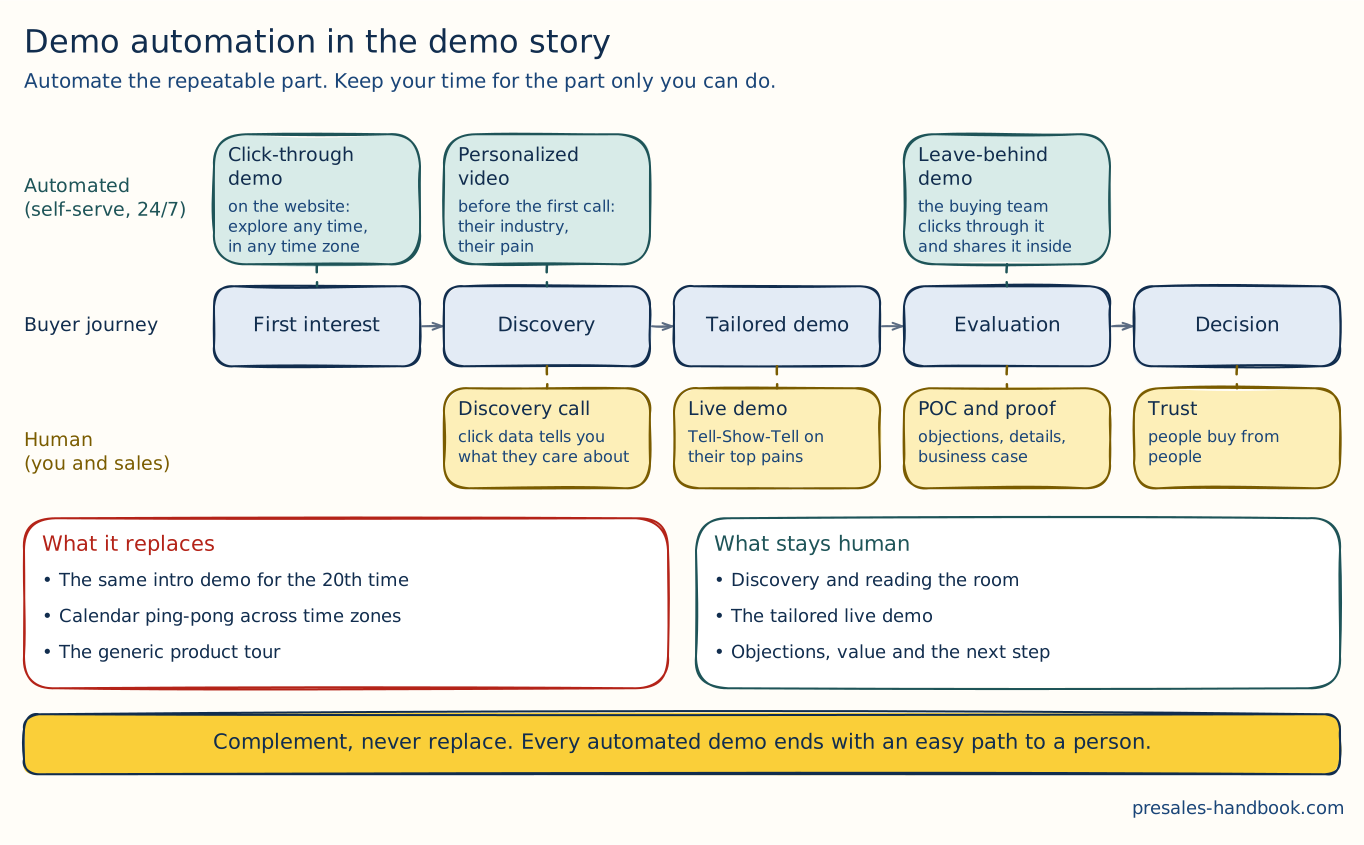
Demo automation in one picture. The green boxes run without you, day and night. The yellow ones need you. Automation takes over the repeat work, so you have more time for the yellow row.
Demo automation changes how sales and PreSales teams reach potential clients. With automated demos, prospects can take an interactive, guided tour of your product at any time. That saves effort and gives modern buyers the fast, self-service access they expect. Here is why it matters and what it brings.
Why is it important?
Immediate Engagement: Prospects often want to see the product right away. Automation lets them explore its features on their own time, which speeds up the first contact.
Consistency and Reliability: Every prospect gets the same high-quality experience. That makes the brand look reliable and keeps the value proposition (opens in a new tab) the same in every interaction.
Pressure Reduction: A live demo can be daunting, especially for PreSales people new to the role or the product. Automated demos take off some of that pressure. PreSales can focus on discovery and the client's deeper needs instead of the mechanics of a live demo.
Pre-Meeting Insights: How a prospect uses the demo shows what interests them and where their pain points are. You can use that to tailor the next sales conversation or discovery session.
Scaling PreSales Efforts: As a business grows, it gets hard to meet demand for PreSales without losing quality. Demo automation lets the team reach more prospects with the same resources.
Using Demo Automation for Maximum Impact
Early Engagement: Bring in automated demos early in the sales process. Prospects then know the product before the deeper sales conversations start.
Complement, Not Replace: Use automated demos alongside personal contact. They are the starting point for more personal, in-depth demos and discussions.
Customization and Personalization: Tailor automated demos to specific industries, use cases or common pain points. Then the demo feels more relevant to the prospect.
Feedback Loop: Build in ways to collect feedback from demo sessions. Use it to improve the product, the sales approach and the follow-up conversations.
Integration with Sales Processes: Connect automated demos fully to your sales process. Prospects should find it easy to request a live follow-up demo or talk to sales afterwards.
Customer Facing Click-Through Demos
Client-facing click-through demos let potential clients try a product or software hands-on. Live presentations depend on finding a time slot. They can also miss the concerns of some stakeholders. A click-through demo lets each person explore the product at their own pace. The main advantages and features:
Key Advantages of Client-Facing Click-Through Demos
Accessibility and Convenience: Prospects open these demos whenever it suits them, with no live demo to schedule. That makes it more likely they engage from the start.
Interactive Experience: Users click through the software's features themselves, much like a test drive. This helps them see the product's value and how it fits their operations.
Personalized Exploration: Users follow their own interests and focus on the features that matter most to them. So each stakeholder gets answers to their own questions.
Enhanced Engagement: When prospects use the product actively, they understand its capabilities better. This often works better than a traditional demo, where people watch passively.
Immediate Availability: Prospects can open the demo anytime and anywhere, with no wait for a scheduled presentation. You catch them while they are most curious, which can shorten the sales cycle.
Implementing Client-Facing Click-Through Demos
To get the most out of click-through demos, consider these points:
Intuitive Design: Make the demo easy to use, with simple navigation and clear instructions.
Highlight Key Features: Organize the demo so that it shows the product's key features and benefits. This makes it easy for users to find the information most relevant to them.
Feedback Mechanism: Add feedback tools to the demo, so users can ask questions or request more information. That feedback also tells sales and PreSales a lot.
Follow-Up Opportunities: Make it easy for users to ask for a detailed live demo. Make it just as easy to start a discussion with the sales team. That links the self-guided tour to the next step in the sales process.
You want to understand how to build these demos?
Check out our Software Recommendation (opens in a new tab)
Personalized Videos
Personalized videos speak to a potential client's own needs, challenges and interests. Generic presentations are the same for everyone. A personalized video uses what you know about the viewer to tell a story that fits them. The key points about personalized demos and their impact:
Key Features of Personalized Demos
Targeted Content: A personalized demo starts from the viewer's specific pain points, whether they come from the industry or the company. The presentation then shows solutions to those problems.
Deep Engagement: Because the demo is about the audience's own needs, it connects with them. Viewers engage much more than with a generic demo.
Connection and Value: Potential clients feel valued and understood. The approach is more consultative and personal than classic sales tactics.
Attention-Grabbing: People see a flood of information. A demo built for their needs stands out. It shows that you took their challenges seriously, and it holds their interest.
Impact of Personalized Demos
Enhanced Connection: Prospects feel closer to the offering when they see their own challenges addressed. They feel the attention you gave them.
Increased Attention and Retention: Content built around the viewer's needs stays relevant. That makes it better at catching and holding attention.
Foundation for Insightful Discussions: When a sales conversation follows a personalized demo, there is already shared understanding and rapport. The conversation is more focused and useful.
Amplified Sales Potential: A personalized demo shows from the start that you understand the client's needs. That leads to better partnerships and raises the chance of a sale.
Benefits of Demo Automation
Demo automation is part of the wider move to digital sales. It has changed PreSales work and fits the needs of modern businesses and their many kinds of clients. What it brings to PreSales:
24/7 Sales Cycle Accessibility
Global Reach: Potential clients in any time zone can open an automated demo whenever it suits them. That widens the window for engagement and sales.
Round-the-Clock Availability: Business hours no longer limit you. The sales cycle keeps running without a salesperson on the call.
Personalization and Relevance
Tailored Experiences: You can tailor automated demos to each potential client's needs, challenges and interests. That gives the demo more impact.
Higher Engagement: Prospects respond more to personalized demos, and their experience gets much better.
Scalability and Consistency
Effortless Scaling: Automation lets a business reach any number of prospects without extra resources or lower quality.
Uniform Quality: Every prospect sees the same high-quality demo, so the brand and the message stay consistent.
Data-Driven Optimization
Insightful Analytics: Built-in analytics show how prospects engage, what they prefer and how they behave. That guides your decisions and how you refine the demo.
Feedback Loop: Real-time data lets you keep improving the demo content to match the market and client feedback.
Cost and Resource Efficiency
Reduced Overheads: Automated demos need less travel, logistics and repeated manual work. That keeps costs down.
Resource Optimization: You use people and money more efficiently and can move them to strategic work.
Foundation for In-depth Engagement
Informed Conversations: Prospects arrive with basic product knowledge. Sales discussions can then be more focused and useful.
Advanced Engagement: Later meetings can go into specifics, solutions and strategic fit instead of a product introduction.
Enhanced Role of PreSales Professionals
Strategic Focus: PreSales gets time back for relationships, strategic deals and deeper work on client needs.
Value Addition: Automation takes over routine tasks, so PreSales can spend more of its time on strategic work.
Agile Feedback Integration
Quick Adaptation: You can update demos quickly based on client feedback or market changes, so they stay relevant.
Continuous Improvement: Fast feedback and quick demo changes fit agile ways of working.
Tools for Demo Automation
From the blog
- 5 min read
What PreSales Can Learn from The Wolf of Wall Street
The Wolf of Wall Street is about bad ethics, but also about storytelling and conviction. What presales can take from it and what to leave.
Read more - 6 min read
What Humane AI Pin’s Failed Launch Teaches Us About the Need for PreSales
The Humane AI Pin promised a lot and failed at launch. What its story shows about the need for honest presales and real discovery.
Read more - 3 min read
What Cooking and PreSales Have in Common
A good recipe, the right ingredients, mise en place and a taste test. What cooking teaches about running great presales work.
Read more