

Career and leadership · Chapter 3
Documenting and Knowledge Sharing
How presales teams capture, review and reuse what they know: a knowledge lifecycle, docs-as-code in Git, knowledge graphs and AI assistants on top.
A presales knowledge base is where your team keeps what it learned in deals. Think demo scripts, RFP answers, objections, competitor notes and templates. It only works when every piece has one home, an owner and a review date. This chapter covers the process first. Then it shows how Git repositories, knowledge graphs and AI assistants make it practical.
Key takeaways
- Treat knowledge like a product: capture, review, publish, use, refresh and retire it. Every page gets an owner and a review date.
- A Git repository with markdown files gives you versions, reviews and owners for free. Linked notes turn it into a knowledge graph.
- AI assistants are only as good as the notes below them. Keep them fresh, and make the assistant cite its sources.
Why documentation matters in presales
Every presales team answers the same questions again and again. How does the integration work? What do we say when the competitor claims X? Where is the latest security questionnaire? Without a shared base, the answer lives in one senior SE's head. That SE is on holiday, in another call or has just left the company.
Good documentation fixes three things. New SEs ramp up faster, because they can read how the team works. Deals move faster, because nobody rebuilds an answer that already exists. And customers get the same quality from every SE on the team.
The catch: documentation rots. A wrong answer in an RFP costs more than no answer at all. So the real work is not writing things down. It is keeping them true.
The knowledge lifecycle
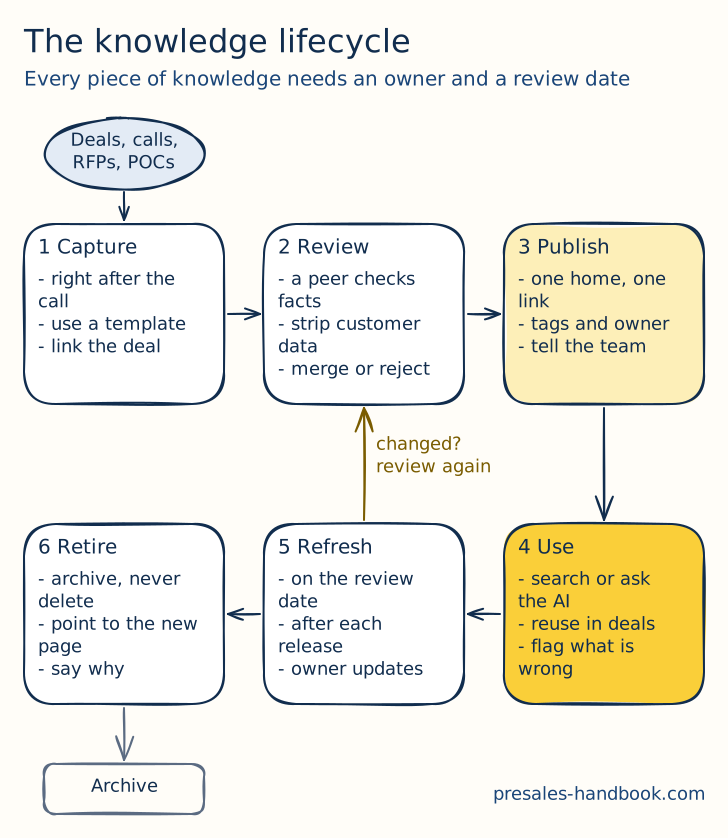
Treat knowledge like a product with a lifecycle. Each step has a clear owner and a clear trigger.
1. Capture: Write it down right after the call, the demo or the RFP. Memory fades within a day. Use a short template so capture takes about ten minutes. Link the deal, so others can see the context.
2. Review: A second person checks the facts before anything goes live. They also strip customer names, prices and anything under NDA. Then they merge it, send it back or reject it. Rejecting is fine. Not every call note deserves a place in the base.
3. Publish: Every piece gets one home and one link. Add tags for product, industry and deal stage. Name an owner. Tell the team in the channel they actually read.
4. Use: People search, browse or ask an AI assistant. They reuse the content in live deals. When something is wrong or outdated, they flag it right there. A flag should take one click.
5. Refresh: Every page has a review date. Three to six months works for most content. Product pages also get a review after every major release. The owner updates the page or confirms it is still true. If the content changed a lot, it goes back through review.
6. Retire: Outdated content leaves the main view. Archive it instead of deleting it, because old deals may still point to it. Add a note on top that says why it was retired and where the new version lives.
What belongs in the base
Keep the scope tight. A small base that is true beats a huge one nobody trusts. These are the content types that pay off in most presales teams:
- Playbook pages: how your team runs discovery, demos, POCs (opens in a new tab) and handovers. The leadership chapter (opens in a new tab) explains how to build one.
- Demo scripts: one script per demo story, with the data setup and the reset steps. See demo automation (opens in a new tab) for keeping demo systems in shape.
- Answer library: approved answers for RFPs and security questionnaires. The RFx chapter (opens in a new tab) shows how to use it.
- Objections: the objection, the real concern behind it and the answer that worked. The objection chapter (opens in a new tab) gives you the handling method.
- Competitor notes: where they win, where they lose and how to test their claims. More in the competition chapter (opens in a new tab).
- Proof: case studies, references and numbers you are allowed to share.
- Lessons learned: what you took away from won and lost deals. The lessons-learned loop (opens in a new tab) feeds this.
- Templates: discovery sheets, solution designs, POC plans and proposal parts.
Docs as code: a Git repository for presales
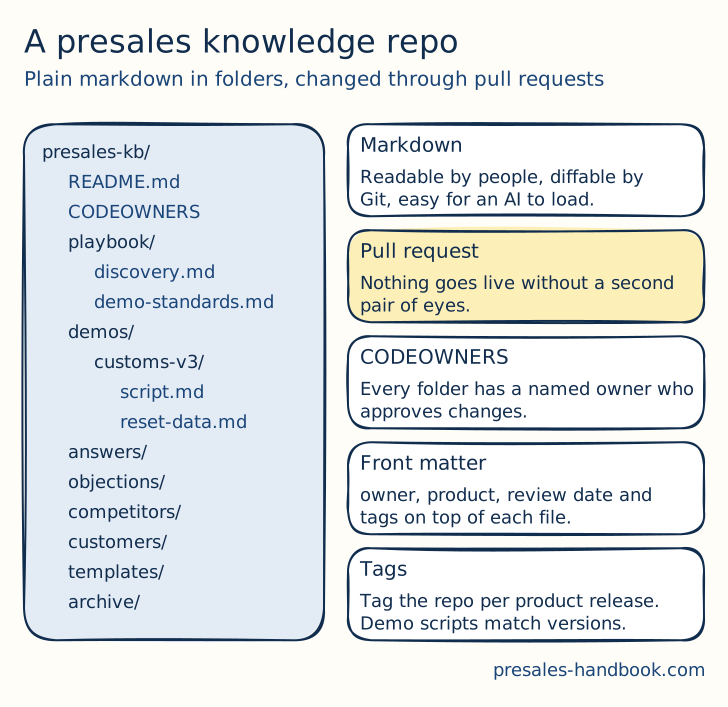
Software teams solved the "who changed what and is it still true" problem years ago. They keep documentation next to the code, in plain text, under version control. Presales can borrow that idea. You do not need to be a developer. You need a private repository on GitHub or GitLab and a few rules.
Why it works so well:
- Markdown is plain text. People read it, Git tracks every change, and AI assistants load it without any conversion.
- Pull requests are your review step. Nothing goes live until a second person approves it. The discussion stays attached to the change.
- CODEOWNERS makes ownership real. A small file maps each folder to a person or a group. GitHub asks that owner to review every change in their folder.
- History answers "since when". You see who changed an answer, when and why. That helps a lot when a customer asks why your RFP answer differs from last year's.
- Versions match your product. Tag the repository for each product release. The demo script for version 3 stays next to version 3, and nobody demos a feature that moved.
- Templates live next to examples. A new SE copies the template and looks at a good example in the same folder.
How to set it up:
- Create a private repository, for example
presales-kb. Add a README that explains the folders and the rules in ten lines. - Create the folders from the list above: playbook, demos, answers, objections, competitors, customers, templates and archive.
- Add a CODEOWNERS file. Give each folder one named owner.
- Add a pull request template with three checks: facts verified, customer data removed, review date set.
- Put front matter on top of every file, so tools and people can filter:
---
title: Integration with SAP S/4HANA
type: answer
product: customs
owner: integration-lead
reviewed: 2026-09-01
review_by: 2027-03-01
tags: [erp, integration, security]
---
- Protect the main branch, so every change needs one approval.
- Let GitHub Actions or a small script list every file past its
review_bydate once a week. Post the list in the team channel.
What to watch out for: Git feels strange to people who never used it. Start them on the GitHub web editor, where a change and a pull request are a few clicks. Keep customer-specific data out of the repository, or use a separate repository with tighter access. And keep polished, customer-facing documents where your company stores them, for example SharePoint or Confluence. The repository is the source. The slide deck is an output.
Knowledge graphs: linking what you know
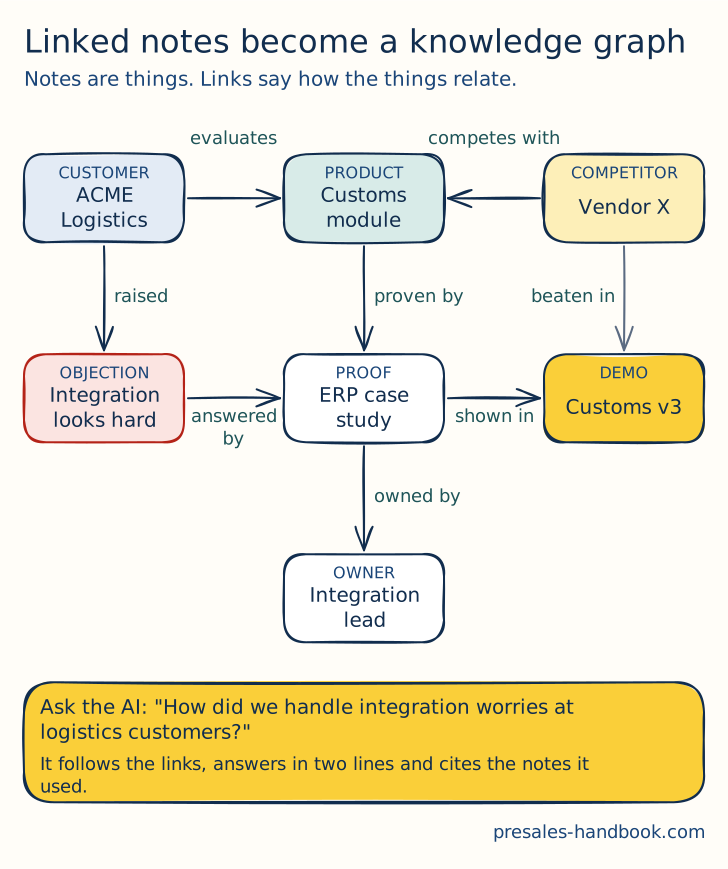
Folders put each note in one place. Real knowledge does not fit in one place. An objection belongs to a product, to the customers who raised it and to the proof that answers it. A knowledge graph captures exactly that. Each note is a thing, and each link says how two things relate.
The entities that matter in presales: customers, products and modules, objections, competitors, proof (case studies, references, numbers), demo scripts and owners. Keep this list short. Five to eight types are enough.
How to build it without a data science team:
- Links in markdown. Every note links to the notes it depends on. An objection note links to the product, the proof and the demo that shows the answer. Tools like Obsidian or Logseq draw the graph from these links. So does a simple script over your repository.
- Typed front matter. Add fields such as
product:,competitor:oranswers:to the front matter. Now each link says what kind of relation it is. - One note per thing. Do not bury three objections in one long page. Small notes link better and stay true longer.
- Backlinks as a health check. A proof note that nothing links to is either unknown or useless. An objection without an answer link is a gap you should close.
Why this pays off: You can answer questions no single page answers. Which objections come up most in logistics deals? Which proof do we have for integration worries? Which demo scripts still show the old UI? With links, each of these is a quick lookup. Without them, it is a week of asking around.
AI assistants on top
An AI assistant turns the knowledge base into something people can talk to. "How did we handle integration worries at logistics customers?" The assistant finds the right notes, follows the links and answers in two lines. The AI toolkit chapter (opens in a new tab) explains the building blocks.
This works when you follow a few rules:
- Feed it the reviewed base only. Point the assistant at the main branch of your repository. Drafts, old call notes and archives stay out.
- Make it cite its sources. Every answer names the notes it used, with a link. No source means no answer.
- Respect the review dates. Tell the assistant to warn when a note is past its
review_bydate. A confident answer from stale content is worse than none. - Keep a human on customer-facing output. The assistant drafts the RFP answer. An SE reads and approves it before it leaves the building.
- Use AI for capture, too. Let the assistant turn a call transcript into a draft note that uses your template. The SE fixes it and opens the pull request. Capture drops from twenty minutes to five.
- Check your company's rules. Only use tools your IT and legal teams approved for customer data.
Graph-aware retrieval is the next step. The assistant then follows the links from customer to objection to proof. You do not need it on day one. Clean notes with good links already get you most of the way.
Best practices: the process
Ownership beats good intentions. Every folder and every page has one named owner. "The team" owns nothing. When an owner leaves, reassign their pages in the same week.
Review before publish, always. Two eyes on every change. For RFP answers and security topics, the reviewer should be the subject matter expert.
Freshness is a number. Track the share of pages past their review date. Below 10 percent is healthy. Above 30 percent, people stop trusting the base.
Retire on purpose. Plan a cleanup every quarter. Archive what nobody opened in a year and what no longer matches the product.
Measure use. Count reused answers, searches that found something and pages linked from live deals. Page count says little. A thousand pages nobody reads only cost upkeep.
Best practices: the execution
Structure: Mirror how your team works. Folders by content type (answers, demos, objections) work better than folders by department. Use tags for product and industry.
Tools: Git and markdown for the source. A viewer that people already use for reading, such as a wiki, a simple site or the assistant itself. Confluence or SharePoint are fine too, if you enforce owners and review dates there. The rules matter more than the tool.
Cadence:
- After every customer call: ten minutes of capture with the template.
- Weekly: fifteen minutes in the team meeting on "new and changed pages".
- Monthly: owners clear their overdue reviews.
- Quarterly: cleanup, archive and a look at the gaps.
- After every major product release: review all demo scripts and product answers.
Templates: Give each content type a short template with the same front matter. An objection note, for example, has four parts. The objection in the customer's words. The real concern behind it. The answer that worked. Links to proof and demo.
Start small: Pick the ten questions your team answers most often. Write one reviewed note for each. Put them in the repository and point an assistant at it. Show the team one real answer in the next meeting. That demo sells the idea better than any policy.
Creating collateral that works
Client-facing collateral is the part of your knowledge customers actually see. It needs the same care.
Know your audience: Tailor the story to the industry, the role and the pain you found in discovery.
Keep it clear: Short sentences, no jargon, one idea per slide or page. Use visuals for complex flows.
Stay consistent: Same logo, colours, fonts and tone across every document. Pull the content from the reviewed base, so the facts match too.
Ground your claims: Use case studies and references as proof. Get permission before you share customer names or numbers.
Keep it alive: Update collateral after releases and after feedback from deals. Retire old versions, so nobody sends the 2023 deck by accident.
Building a sharing culture
People share knowledge when it is easy and when it gets noticed. Build both into the team's routine.
Share in the rhythm you already have: Add a five-minute "what I learned this week" slot to the team meeting. The best stories become notes.
Give credit: Name the author when a note helps win a deal. Mention contributions in reviews and promotions. People share more when it is seen.
Work across teams: Invite sales, product, services and support to review the pages in their area. They see what customers ask, and you get better answers.
Teach the why: Show new SEs how the base works in week one. Explain that every note they write saves the next person an hour.
From the blog
- 2 min read
When a House of Cards Collapses: Why Radical Honesty Is a PreSales Superpower
A project I worked on failed badly. What it taught me about radical honesty, and why it is one of the strongest skills in presales.
Read more - 4 min read
The Rare Art of Caring: Why PreSales Must Lead with Craftsmanship and Conviction
In a world of shortcuts, caring about the work is rare. Why presales should lead with craftsmanship and conviction.
Read more - 5 min read
The Power of Curiosity in PreSales: Why It’s Your Greatest Asset
Curiosity drives better discovery, stronger relationships, sharper demos and calmer objection handling. Why it is a core presales skill.
Read more
In the course
- The PreSales MindsetMembers only
- Core Metrics for PreSalesMembers only
- Documentation & Knowledge SharingMembers only