

How AI works and how to use it in presales · Lesson 52 of 75 · 10 min
What AI is, and what it is not
A language model predicts the next piece of text from the text you give it. It sounds sure whether it is right or wrong, so checking stays your job.
How a language model works
The assistants you use at work run on a language model. A language model does one thing: it reads text and predicts what text comes next.
You type a prompt, and the model reads all of it. Then it works out which pieces of text are likely to follow. It picks one, adds it, and looks again. Now the text is one piece longer, and it predicts the next one. This loop runs until the answer is complete.
Those pieces are called tokens, and a token is a word or a part of a word. A short, common word is often one token, while a long or rare word splits into several. A product name the model has rarely seen can split into many small parts.
So the model builds every answer piece by piece. No finished answer sits in a database, waiting to be looked up. This one fact explains most of what you will see in daily use.
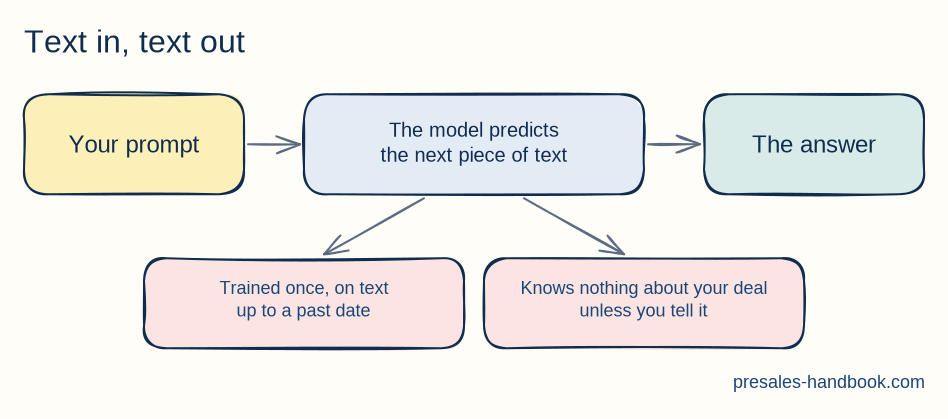
Text goes in, the model predicts, text comes out.
Where does the skill come from? During training, the model read a very large amount of text. It learned which words and ideas tend to go together. That is why it can write an email, sum up a call or explain a contract clause. All of these are patterns in text, and the model has seen many of them.
Training and use are two phases
A model has two separate phases in its life.
The first is training: the provider trains the model once, on text collected up to a certain date. After that date the model has read nothing new. Training takes a long time, and it ends before you ever open the product.
The second is use, the moment you type a prompt and get an answer. The model reads your text and predicts, but it does not learn from your chat while you work. Tell it something on Monday, and a fresh chat on Tuesday starts from zero.
Two details can make this look different.
Inside one chat, the model seems to remember. With every new message, the whole chat goes back in as text and the model reads all of it again.
Some assistants also keep notes about you between chats. Those notes are text too, and the product adds them to your prompt behind the scenes. The model itself has not changed.
A provider may use chats to train a later model. Whether it does depends on your plan and your settings. It is one more reason to read your company's AI policy before you paste customer data.
What it cannot know
The model knows only what was in its training text and what is in your prompt.
It does not know your deal. It has never seen your CRM, and it was not on last week's discovery call. It cannot read your price list, your roadmap or your reference list. It also missed everything that happened after its training ended, including yesterday's news about your prospect.
There are two ways to close this gap. You put the facts into the prompt. Or the assistant has a tool that fetches them, such as a web search or a connector to your files. In both cases the facts arrive as text, at the moment of use.
Everything the model can read at that moment is called its context. The next lesson is about context, and how to give the model the right one.
How to phrase the request itself is a separate skill, and the lesson on prompting (opens in a new tab) covers it.
Why it sounds sure and can still be wrong
The model is built to continue text in a likely way. Likely and true are two different things.
Most of the time they match. The capital of France appears in the training text countless times, and the likely answer is the true one. On a niche topic there is less text to learn from, but the model still produces fluent sentences. It fills the gap with what usually stands in such a place. The result reads well and can be false.
You cannot hear the difference: a person who guesses often slows down, hedges or says "I think". A model writes a guess in the same calm tone as a fact. Fluent writing is no proof of a correct answer.
Ask the same question twice, and you can get two different answers. The model does not always take the single most likely piece. It picks among several likely pieces, with some chance involved. One different piece early on can send the whole answer down another path.
Use this to your advantage: if two runs disagree on a fact, treat neither as checked.
A presales example
The names in this example are made up. Say you work for Tarnwick, a vendor of route planning software. You have a first call with a freight company tomorrow, and you want reference names for your opening slide.
You ask the assistant: "Name three logistics customers who use Tarnwick."
It answers in seconds: Kestrelway Freight, Ostwind Cargo and Dunmore Pike Logistics. Each name comes with a neat line about the results they achieved.
You check. Kestrelway Freight is a real customer of yours, but the other two do not exist.
Why did this happen? The model saw little or no text about your customer base. You still asked for three names, so it produced three. It knows what a list of logistics customers looks like, and names that fit the pattern are likely text. Whether those companies exist plays no role in the prediction.
Now imagine that slide in front of the prospect. One search on their side, and your credibility is gone before discovery starts.
The better request gives the model the facts and a narrower job. Paste your approved reference list into the prompt. Then ask: "Pick the three references from this list that best fit a freight company. Give one reason for each. Use only names from the list. If fewer than three fit, say so."
Now the model selects and explains, and it no longer has to recall anything. That is work it does well. You still compare the three names with your list before the slide goes out.
Try it
This takes ten minutes.
- Pick one factual question about your own product. Choose one where you know the answer for sure. A good example is which systems you integrate with out of the box.
- Use only public facts. Do not paste customer data.
- Open Claude, or the assistant your company allows. Ask the question in a fresh chat.
- Start a second fresh chat and ask again, word for word. Then do it a third time.
- Put the three answers side by side. Mark what is the same, what differs and what is wrong.
- Now paste the relevant page of your public product documentation into a new chat. Ask the same question once more and compare.
Most people see small differences between the first three runs, and some see an invented detail. The last run is usually the closest to the truth, because the facts were in the prompt.
What stays with you
- A language model predicts the next piece of text. It does not look answers up.
- It was trained once, on text up to a past date. Using it does not teach it.
- It knows nothing about your deal unless the facts are in the prompt or a tool fetches them.
- A fluent answer can be wrong, and the same question can give different answers.
- Give it your facts and ask it to work with them. Then check the result before it reaches a customer.
How AI changes this
As of November 2026
- What AI already does
- An AI assistant drafts, sums up and selects from the text you give it, in seconds.
- What stays with you
- You bring the facts about the deal, and you check every claim before it reaches a customer.
- Try this week
- Ask one factual question about your product in three fresh chats. Compare the answers and mark what differs.
Keep going
Check what you learned
Pick an answer. You see right away if it is right.
Something wrong or unclear in this lesson?