
Selling journey · Chapter 2
Understanding SaaS
What Software as a Service is, how it differs from on-premise software, and what that means for the way presales sells it.
Video: Software as a Service for PreSales (SaaS)
The Essence Of SaaS
SaaS changes how software is distributed. Traditional software has to be installed on each computer or server. SaaS applications run on a provider's servers instead. Users reach them over the internet. Any device with an internet connection will do, usually through a web browser.
This approach has a few clear traits. The most obvious one is web access. With an internet connection you can use SaaS wherever you are and on whatever device you have. That matters a lot in a time of remote work and global teams.
The model also rests on multi-tenancy. One instance of a SaaS application serves many customers. Each customer's settings, data and configuration stay separate from the others.
Unlike traditional software purchases, SaaS usually runs on a subscription. Customers pay at regular intervals, monthly or yearly, to get access. It works more like renting than buying. That adds flexibility and removes the large upfront costs of traditional software.
Updates are much easier with SaaS. Users no longer have to update the software themselves or check that they have the latest security patch. Because SaaS runs centrally, the provider rolls out updates for everyone. Every user gets the latest features and improvements without doing anything.
SaaS also scales. Organizations can adjust the software to their needs, whether they add features or expand capacity. This usually happens without the long processes that expanding traditional software requires.
SaaS providers usually take care of security, maintenance and compliance. This keeps the software up to date and in line with current security protocols and compliance rules.
Multi-Tenant vs. Single-Tenant
Multi-Tenant Architecture
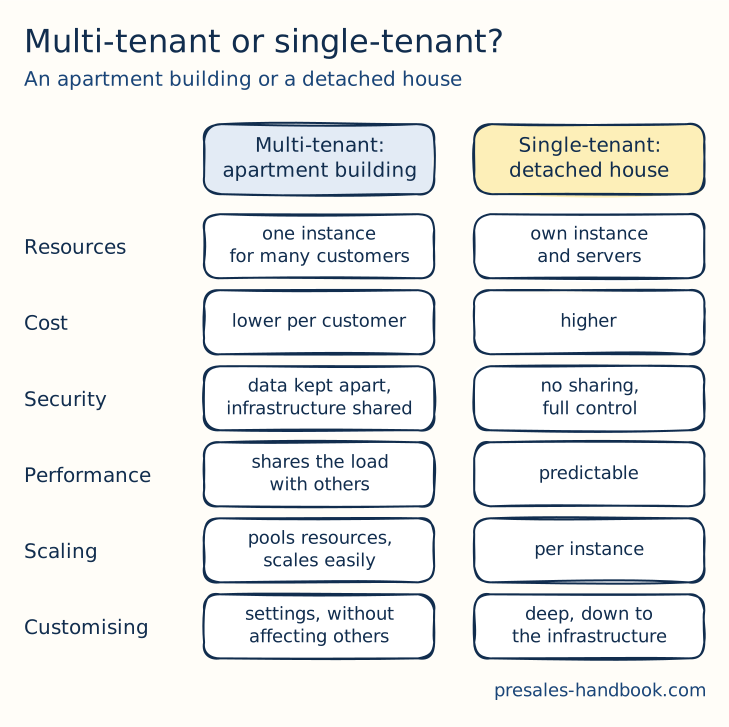
Multi-tenancy works like an apartment building. All residents share one building. Each resident has their own apartment and can furnish it as they like. But the infrastructure underneath is shared, including plumbing, heating and the building's frame. In SaaS terms, this means:
- Shared Resources: One instance of the software and its supporting infrastructure serves multiple customers. Each customer shares the same database, application, and computing resources.
- Cost-Effective: Because resources are shared, the cost per customer can be lower.
- Upgrades and Maintenance: Central management of the application makes it easier to roll out updates and improvements to all customers at once.
- Customizability: While the core application is the same, customers can often configure settings or features to suit their specific needs without affecting others.
Single-Tenant Architecture
Single-tenancy is like owning a detached house. You share nothing with the neighbors and have full control over your space. In SaaS terms, this means:
- Dedicated Resources: Each customer has their own instance of the software along with the dedicated underlying infrastructure (servers, databases, etc.).
- Enhanced Security: As resources are not shared, the risks associated with cross-customer data breaches are minimized.
- Customization: The customer can deeply customize the software and infrastructure to meet specific needs.
- Cost: Typically more expensive than multi-tenant solutions due to the costs associated with maintaining multiple separate instances.
Comparison and Context
- Security: Single-tenant architectures offer higher levels of security and control, which can be crucial for companies with stringent data protection standards.
- Performance: Single-tenancy can provide more predictable performance since customers are not affected by the resource demands of others.
- Scalability: Multi-tenant architectures are generally more scalable, as the provider can pool resources more effectively across a larger number of customers.
For a SaaS provider, multi-tenancy makes scaling and maintenance easier and cheaper. Single-tenancy offers tailored solutions for specific customer requirements, at a higher cost. For businesses, the choice comes down to a trade-off. On one side are customization and control. On the other are lower costs and managed services.
Key Characteristics of SaaS
Web Accessibility: SaaS applications are accessible from any internet-connected device, typically without installation.
Multi-Tenancy: A single instance of the software serves multiple customers. Each customer's settings, data, and configurations stay separate.
Subscription-Based: SaaS is often offered on a subscription basis, where customers pay regularly (e.g., monthly or annually) to access the service.
Automatic Updates: Providers can update the software centrally, ensuring all users can access the latest features and security patches.
Scalability: SaaS solutions can typically be scaled easily, with users able to add features or expand capacity based on demand.
Managed Security and Compliance: The SaaS provider usually manages security, maintenance, and compliance. This relieves users from these responsibilities.
Advantages
One of the biggest benefits of SaaS is cost. Businesses often cut their IT costs a lot because they no longer buy hardware, software licenses or on-site maintenance. Users can work with the software from anywhere in the world. That gives flexibility and suits remote work.
Many SaaS products include collaboration tools. Users work at the same time and share ideas and plans in real time. This helps teamwork and can make project management and joint work much better.
Data security gets extra attention with SaaS. Many buyers worry about storing data off-site. Many SaaS providers invest heavily in security. They also invest in regular backups and full disaster recovery plans.
Cost-Effective: Costs are often reduced because there's no need for hardware acquisition, software licenses, installation, or on-site maintenance.
Accessibility: As mentioned, users can access SaaS applications from anywhere with an internet connection, promoting flexibility and remote work.
Automatic Upgrades: Organizations benefit from always using the latest software version without undergoing manual update processes.
Collaboration: Many SaaS offerings come with built-in collaboration tools that allow users to collaborate in real-time.
Security: There is often concern about data being stored off-site. Many SaaS providers invest heavily in security, backups, and disaster recovery.
Customizability: SaaS platforms often feature high levels of customization, allowing users to tailor the software to their specific needs.
Differentiators
When we compare Software as a Service (SaaS) with other ways of distributing software, we see some big differences. Traditional software that you install on your own computer or server needs a lot of hands-on work. You have to install the software on each machine, which can be expensive and time-consuming. Plus, you're in charge of keeping the software updated and fixing any problems.
SaaS, on the other hand, makes things a lot easier. Everything is centralized, meaning you can access your software from anywhere. You only pay for what you use, and the company that provides the software takes care of updates and maintenance.
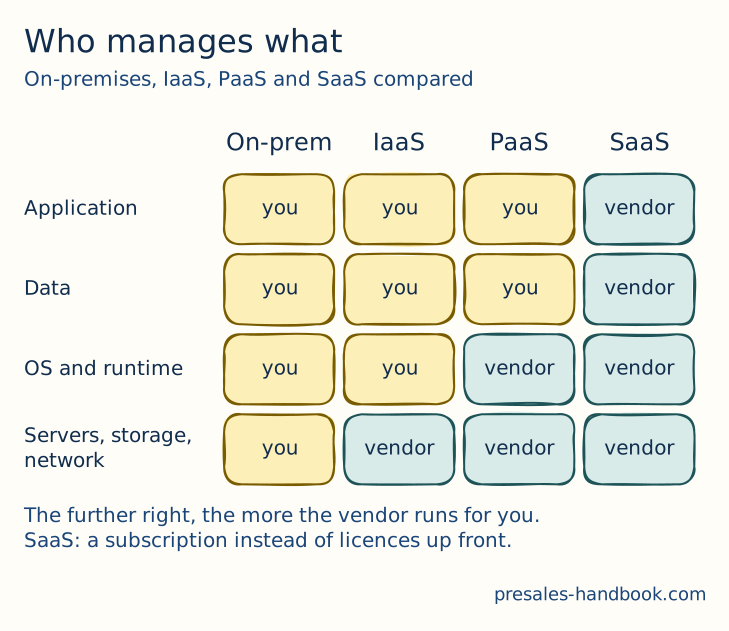
There are also other types of cloud services, like Platform as a Service (PaaS) and Infrastructure as a Service (IaaS). PaaS gives you a platform where you can create, run and manage your own applications. You do not have to deal with the technical details underneath.
IaaS is a bit different. It gives you the basic virtual computing resources you need over the internet. But you have to manage everything else, like the operating system, applications, and data. You get the foundation and build the rest yourself.
Traditional On-Premises Software: Traditional software requires installation on individual machines or company servers. SaaS, in contrast, is centrally hosted in the cloud. On-premises solutions often require large upfront costs for licenses, while SaaS typically operates on a pay-as-you-go subscription model. With traditional software, the onus of updates and maintenance falls on the user. SaaS providers handle these aspects centrally.
Platform as a Service (PaaS): While SaaS delivers software over the web, PaaS provides a platform. It lets customers develop, run, and manage applications without dealing with the complexity of building and maintaining infrastructure.
Infrastructure as a Service (IaaS): IaaS provides virtualized computing resources over the internet. It offers the infrastructure, including servers, storage, and networking. But users must manage the operating system, applications, and data.
PreSales Perspective
For PreSales, SaaS brings its own opportunities and challenges. Demonstrating a SaaS tool, for example, has become much simpler. PreSales professionals can show the software to prospects without needing physical installations. However, potential clients often want to know how a SaaS solution can be tailored to their specific needs. That's a slightly different ask than a traditional software demo.
With SaaS, the data is hosted off-site, so security becomes a main topic. PreSales experts need to handle these concerns well and explain the strict measures that keep data safe. Integration matters too. Many organizations use several SaaS solutions, so easy integration between tools is critical.
Explaining the value of a subscription model takes care. PreSales professionals need to show the benefits over the long term and stress flexibility and scalability. The subscription model also means the client always has the latest version, without the hassle of manual upgrades.
Key Takeaway
Demonstrations: SaaS tools can be demoed remotely, so you can show prospects the software without installing anything.
Customization: Prospects might want to understand how a SaaS solution can be tailored to their needs, which might differ from traditional software demonstrations.
Security Concerns: Since data is hosted off-site, PreSales professionals must be equipped to address security and compliance concerns.
Integration Discussions: Organizations often use several SaaS tools. You need to understand and show how a solution connects with the others.
Subscription Models: Explaining the value proposition (opens in a new tab) over time, as opposed to a single upfront purchase, requires understanding the customer's long-term needs.